Meta Ad Library: The Complete Guide for Marketers (2026)
The Meta Ad Library is a free, public database at facebook.com/ads/library that shows every ad currently running on Facebook, Instagram, Messenger, and the Audience Network, from any advertiser in the world. No account needed, no cost, no login wall. If you buy media, sell creative, or run a store that competes with anyone on Meta, it is the single most useful free research tool you have.
I've used it almost daily for years, and most marketers I meet still only scratch the surface of it. This guide covers what it actually shows, what it deliberately hides, and the workflows that turn it from a curiosity into a weekly habit that pays for itself.
What is the Meta Ad Library?
It's Meta's transparency database. After the scrutiny Facebook faced over political advertising in 2018, Meta built a public archive where anyone could inspect political ads. It then expanded that to cover all ads: today, every active ad from every advertiser on Meta's platforms is publicly viewable, whether or not you were in the ad's target audience.
That last part is the whole point. Normally you only see ads Meta decides to show you. The Ad Library removes the targeting veil: you can look up any brand, in any country, and see exactly what they're running right now.
One important mental model before we go further: it is a window, not an archive. Outside the EU, when an advertiser stops an ad, it disappears from the library. There is no history tab. If you see something worth studying, save it that day, because it may be gone next week.
How do I get to the Meta Ad Library?
Go to facebook.com/ads/library. That's it. It also lives at facebook.com/ads/library/ if you're typing it, and searching "Meta Ad Library" in Google gets you there. You don't need a Facebook account to browse it, though a login sometimes reduces the rate-limit friction if you're doing heavy sessions.
When the page loads you'll pick two things before searching:
- Country. Which country's ad delivery you want to look at. This matters more than people realize — a brand can run entirely different ads in the US vs. Germany, and the library shows you results per country.
- Ad category. For normal competitor research, choose "All ads." The other categories (issues, elections, politics; housing; employment; credit) exist because those ad types carry extra transparency requirements.
Then you type either an advertiser's name or a keyword into the search bar. I've written a separate deep dive on the search mechanics and its quirks — see Facebook Ad Library search: filters, tricks, and fixes — because the search box is genuinely the clunkiest part of the product.
What can you actually see in the Ad Library?
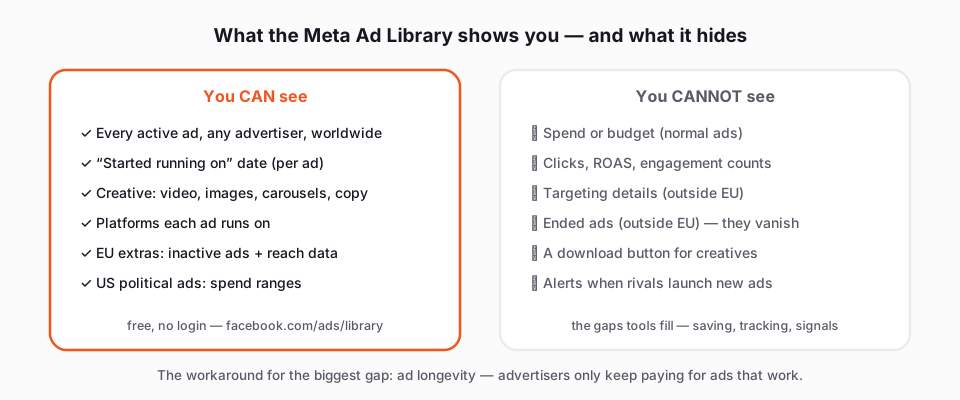
For every active ad, the library shows:
- The full creative. Video, image, or carousel, exactly as it renders in feed. You can play videos and click through carousel cards.
- The primary text, headline, and CTA button.
- "Started running on" date. The single most valuable data point in the whole tool — more on this below.
- Platforms. Small icons show whether the ad runs on Facebook, Instagram, Messenger, and/or Audience Network.
- Ad variants. When an advertiser runs multiple versions under one ad (different text or media combinations), the library notes that the ad has multiple versions.
- The advertiser's page, with a link to their page transparency info.
If you're browsing from the EU, you get more, because the Digital Services Act forces it: ads that ran in the EU stay visible for a period even after they stop, and you can see limited audience information — rough reach figures and the broad targeting parameters (age, gender, location) the advertiser used. EU-based researchers genuinely have a better version of this tool.
For US political and issue ads, the library shows spend ranges and impression data, and there's a downloadable report. That data does not exist for commercial ads.
What the Ad Library will NOT show you
Being honest about the gaps saves you from wrong conclusions:
- No engagement numbers. You cannot see likes, comments, shares, or view counts from the library listing itself.
- No spend or performance data for normal ads. You cannot see budget, ROAS, CTR, or impressions on a commercial ad.
- No targeting details for normal ads (outside the EU's limited disclosure). You can't see who an ad is aimed at.
- No ended ads (outside the EU). Once it stops, it's gone.
- No download button. Meta gives you no way to save a video, image, or carousel out of the library.
So how do professionals extract a performance signal from a tool that shows no performance data? The answer is longevity.
How to read the "Started running on" date
Advertisers keep paying only for ads that work. That's the entire logic. An ad that has been running for four months is an ad someone has been happily funding for four months — which almost always means it's profitable. An ad that appeared three days ago is a test that may not survive the week.
Two patterns worth learning to spot:
A fresh test batch. Search a brand and you see eight ads that all "Started running on" the same recent date, often with similar copy and different hooks or thumbnails. That's a creative test in progress. Interesting for seeing what angles they're exploring, but none of it is validated yet.
A proven winner. One ad from that brand started running months ago and is still live while dozens of newer ads have come and gone around it. That ad is carrying the account. Study it hard: the hook, the first three seconds, the offer framing, the CTA. This is the closest thing to spend data Meta will ever give you for free.
Sort by the dates, mentally or in a spreadsheet, and the library stops being a wall of creatives and becomes a ranked list of what's working.
How do marketers actually use it? Three workflows
1. The pre-launch competitor check
Before I launch ads for any product, I spend 30 minutes in the library looking up the three or four brands I'll be bidding against. What formats dominate — UGC video, static product shots, carousels? What offers are they leading with? Which of their ads are old (proven) versus new (tests)? This tells me the table stakes for the auction I'm about to enter, and often reveals an angle nobody in the niche is using.
2. Finding creative patterns in a niche
Instead of searching a brand, search a keyword — the product category, a benefit phrase, a pain point. You'll surface ads from brands you've never heard of, including small advertisers who are often the most creative because they can't outspend anyone. When five unrelated brands in a niche all converge on the same hook structure, that's not coincidence; that structure is converting.
3. The weekly rival monitor
Pick your top two or three competitors and check them every Monday. New ads launched? A long-runner finally killed? A new offer or landing page angle? Fifteen minutes a week builds a genuinely current picture of your market. The frustrating part is that the library gives you no way to track changes — no alerts, no history — so this only works if you save what you see each week.
What about the gaps — and the tools that fill them?
The limitations above are exactly why the paid spy-tool market exists. AdSpy ($149/mo), Minea (from $49), BigSpy (from $9, with a free tier), Foreplay (from $59) and others add historical archives, engagement data, and filtering the library lacks. They're worth it for some teams; overkill for many.
The most common gap, though — saving ads before they vanish — doesn't need a paid tool. This is the disclosed part: we make a free Chrome extension for exactly this. It adds a Download button to every ad inside the Ad Library, pulls videos in original HD (no watermark), grabs full carousels rather than just the first card, and a "Find all ads" bulk mode collects an advertiser's entire set of running ads into one ZIP with a searchable swipe board and a CSV. No account, no sign-up, and everything runs in your own browser. You can grab it at klipio.io/meta-ad-library-downloader, and I've written up the full workflow in how to download Facebook Ad Library videos.
One note on ethics and rights, since it comes up: browsing and saving public ads for competitive research is standard practice — it's public transparency data, and every major spy tool is built on it. What you shouldn't do is re-use someone else's creative commercially. Copy the angle, never the asset. (That's practice, not legal advice.)
FAQ
What is the Meta ad library?
The Meta Ad Library is a free public database at facebook.com/ads/library showing every ad currently active on Facebook, Instagram, Messenger, and the Audience Network. Meta built it as a transparency measure, and anyone can search it by advertiser name or keyword without an account.
How do I get to the Meta ad library?
Go directly to facebook.com/ads/library in any browser, or search "Meta Ad Library" and click the first result. Select a country and the "All ads" category, then search for an advertiser or keyword. No Facebook login is required to browse.
Is the Meta Ads library free?
Yes, completely. There is no paid tier, no account requirement, and no limit on how many advertisers you can look up. The paid tools in this space charge for what the library lacks — history, engagement data, and organized saving — not for access to the ads themselves.
How to search Facebook ads library?
Choose a country, set the category to "All ads," then type either an advertiser's name (to see everything one brand runs) or a keyword (to see ads across many brands mentioning that phrase). The search is exact-match and can be finicky; if a brand doesn't appear, try alternate spellings or find their Facebook page first and click through from its Page Transparency section.
How can I find an ad I saw on Facebook?
Search the Ad Library for the advertiser's name in your country, then scan their active ads for the one you remember. If you can't recall the brand, try searching a distinctive phrase from the ad's copy. Be quick about it — if the advertiser has stopped the ad, it will no longer appear in the library outside the EU.
The Klipio extension adds a download button to every ad in the Meta Ad Library: one click per ad, or bulk-save a whole search as a ZIP with a searchable swipe file inside. Free, no sign-up.
Get the free Ad Library downloaderKlipio reads a competitor's live Meta ads, ranks them by how long they have been running — the honest signal that an ad is profitable — and turns the winning angle into on-brand creative for your own brand. 3-day free trial.
Start free — 3-day trial →