Bulk-Download Every Ad From a Meta Ad Library Search
You searched a brand or keyword in the Meta Ad Library, the page shows 200+ running ads, and you want all of them saved — not one, all. There's no built-in way to do that: the library has no download button, no export, and no bulk anything. The working method is a free browser extension that scans the search (up to 2,500 ads per run) and saves them all at once, and this post is that exact workflow plus what to do with the pile of files afterward.
I do this at the start of every creative sprint. Before we write a single new ad for a client, I pull everything their top three competitors are running. Here's the full process.
Why can't I just save ads manually?
Three reasons the manual route dies fast.
First, right-click doesn't work. Ad videos in the library play through Facebook's player, which offers no save option. You can extract single files through the browser's devtools Network tab — I covered that and every other single-ad method in how to download videos from the Facebook Ad Library — but it's a multi-step ritual per ad. At 200 ads, that's an afternoon gone.
Second, the library is not an archive. It only shows ads that are currently running (the EU view includes some inactive ads, but that's the exception). The moment an advertiser pauses a campaign, those ads vanish. I've lost reference creatives this way more than once: found a great hook on Tuesday, went back Friday to show a client, gone. If a search is worth studying, capture it the day you run it.
Third, the library's own search won't help you re-find things. It's exact-match and clunky — search "sofa" and you won't see the ad that says "couch." You can't search by hook or CTA at all. So even bookmarking the search URL doesn't preserve what you actually found.
What's the workflow to bulk-download a whole search?
I use our own free Chrome extension for this — the Klipio Meta Ad Library Downloader (disclosed: we built it, it's free, no account or sign-up). Here's the run-through:
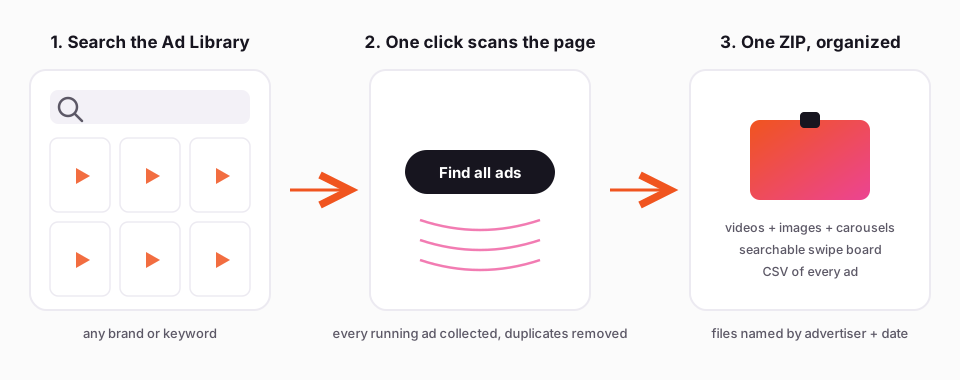
1. Run your search in the Ad Library. Go to facebook.com/ads/library, pick the country, and search a brand name or a keyword. Apply whatever filters you want — the scan respects what's on screen, so filter to Videos in the library first if that's all you want.
2. Click "Find all ads." Instead of downloading ads one by one, this scrolls the results page for you and collects the running ads it finds, up to 2,500 per run (you can keep going). On a big brand this is a few hundred ads; go make coffee.
3. Pick Videos / Images / Everything. Choose what goes in the export. Videos come in HD when Meta has it, with no watermark, images as images, and carousels come with every card — not just the first one, which is where most single-URL downloader sites give up.
4. Get a ZIP. Everything lands in a ZIP file (very large exports are split into numbered parts). Files are named by advertiser and date, so brandname_2026-08-14_... sorts cleanly in a folder, and duplicates are collapsed automatically — Meta serves the same creative under multiple ad IDs constantly, and you don't want 14 copies of the same video.
5. Open the swipe board. Every export includes an index.html that opens in any browser. This is the part I actually live in: search every downloaded ad by hook, CTA, or advertiser, play the videos in place, copy the ad text with one click, and jump back to the original in the Ad Library. It's the searchable layer the Ad Library itself never gave you, and it works offline because everything is local.
6. CSV for the spreadsheet people. The export also includes a CSV of every ad — advertiser, dates, ad text, the works. If your team lives in Sheets or you want to pivot on start dates, this is your file.
The extension runs entirely in your browser on your own connection; nothing passes through Klipio's servers. Install is at klipio.io/meta-ad-library-downloader. It's free with no watermark. (There's an optional Klipio Studio, $9/month, for sharing boards with a teammate, but the bulk ZIP workflow above is entirely free.)
If you'd rather not install anything, the honest alternative is a paid spy tool — AdSpy at $149/mo or Foreplay from $59/mo will both get you bulk saving plus their own databases, and they're good tools if you also need engagement data or team briefing features. For pure downloading they're overkill.
What should you actually DO with 300 downloaded ads?
A folder of ads is not research. Here's the pass I run on every export, and it takes about an hour.
Sort by longevity first. This is the one performance signal Meta gives you. The library shows every ad's start date ("Started running on..."), and it's in your CSV. Advertisers keep paying only for ads that work — nobody funds a loser for three months. So sort the CSV by start date and flag everything running 90+ days. Those ads are paying for themselves, and they're your real competitive intel. The ad that launched last week tells you what a media buyer is testing; the ad running since March tells you what's printing.
Mine the angles, not the ads. Take your 90-day club and write down, for each ad: the hook (first line or first 3 seconds), the core claim, the emotion it's pulling on, and the CTA. Patterns show up fast. Maybe every long-runner in your niche opens with a problem statement, not the product. Maybe they all use customer language instead of brand language. That pattern is what you take into your own creative — never the asset itself. Re-running someone else's creative is how you get reported; copying the angle in your own voice and footage is how the entire industry works. (Standard practice, not legal advice.)
Group by format. Split the folder into statics, videos under 15 seconds, long videos, and carousels. If a competitor runs 40 ads and 30 are carousels, they've learned something about their audience that you get to borrow for free.
Search your board like a buyer. In the swipe board, search CTAs: how many say "Shop now" versus "Learn more"? Search hooks for price mentions, for "you," for questions. Five minutes of this beats an hour of scrolling the library raw.
Re-scan monthly. The real compounding trick: run the same search every month and diff against last month's CSV. Ads that disappeared got killed. Ads that survived another 30 days got stronger as signal. New ads show where the brand is testing next. Because the library only shows the present, your own exports become the archive Meta never built.
FAQ
How to save ads from Facebook ad library? There's no save or download button in the library itself. For a single ad you can extract the video via the browser devtools Network tab; for anything more, install a free extension like Klipio's Meta Ad Library Downloader, which adds a Download button to every ad and a "Find all ads" bulk mode that ZIPs an entire search. Save early — ads disappear from the library when advertisers pause them.
How to extract data from Facebook ads? For public ads, the Ad Library shows each ad's creative, text, start date, and platforms, and a bulk export tool can turn a whole search into a CSV with all of that per ad. Note that normal (non-political) ads carry no spend or engagement numbers anywhere — the closest performance proxy is how long the ad has been running.
Can you search for a specific ad on Facebook? Yes — go to facebook.com/ads/library, choose the country and ad category, and search by advertiser name or keyword. The catch is that search is exact-match and only covers currently running ads, so you can't find a paused ad or search by concept. That's why serious researchers export searches to a local, searchable swipe board instead of relying on the library.
The Klipio extension adds a download button to every ad in the Meta Ad Library: one click per ad, or bulk-save a whole search as a ZIP with a searchable swipe file inside. Free, no sign-up.
Get the free Ad Library downloaderKlipio reads a competitor's live Meta ads, ranks them by how long they have been running — the honest signal that an ad is profitable — and turns the winning angle into on-brand creative for your own brand. 3-day free trial.
Start free — 3-day trial →